I'm building Caffeine, a compiler written in Gleam that compiles service expectations to reliability artifacts. This post documents how I set up a simple playground environment so folks can experiment with Caffeine right here from their browser.
Overview
At the Cafe

Truly one of the most beautiful cafes my wife and I have been to! Florencia y Fortuna in Cusco, Perú. Coffee was spectacular as well. Image from their website.
Ah, how nice. You stroll into a new cafe, the air filled with the aroma of freshly ground beans, the chatter of lively conversations hums about. There's really nothing like a cafe to inspire. Experimentation, creativity, focus, engaging discussions. One of my favorite places to go on a free Friday morning.
While I will stop here before I make an outlandish analogy that Caffeine's minimal, in-browser IDE is a virtual version of the perfect cafe experience, it at least shares the name, even if that's where the semblance stops.
Background on the Site
Caffeine's website is a static site built from Lustre Lab's static site generator. Of the many static site generators out there, this ssg is fairly simple. In the words of its README:
"lustressg is a low-config static site generator for simple things like a personal blog or documentation site. Declare your routes, tell lustressg how to render them, and it will spit out a bunch of HTML files for you. lustressg is not a batteries-included framework for generating static sites. There is no CLI, no built-in server, no fancy data fetching, and no client-side hydration. If you need those things, you will have to build them yourself!"_
I will be the first to admit I am not a frontend person, and lean fairly heavily on AI tools like Claude Code and Cursor to bring my website ideas to life (especially CSS 😤). However, per the definition from Wikipedia, I am not a true vibe coder because I still like to ensure I have some idea how everything works, so let's dive in.
Making the Compiler Browser Friendly
As of last month, Caffeine has been shipping binary releases targeting Mac, Linux, and Windows via GitHub (see here) by way of a process I automated in a GitHub Action that is triggered whenever I push new git tags. The gist of the packaging process is detailed in an earlier post titled "Packaging Caffeine". The TL;DR of that is:
1. Ensure you can target JavaScript (likely have to fill in some FFI gaps)
2. Add a JavaScript entry point
3. Compile with Deno
Really, not too hard once you get past (1). From here, heavily borrowing from existing work (i.e. the Gleam playground), we established a process for fetching the latest JavaScript build for the compiler via a bundle script which includes some shims for Node.js modules and actually calling the main compilation method.
One detail worth highlighting: even though Caffeine's browser mode bypasses all file I/O, we still need shims for node:fs, node:path, and node:process. This is because simplifile (a Gleam file I/O library Caffeine depends on) imports these Node.js modules at the top level. When esbuild bundles with --platform=browser, these built-ins don't exist, so we provide stub implementations via --alias flags. The stubs throw errors if called, but the imports themselves need to resolve for the bundle to build.
With this, we just need an editor and we're ready to begin integration.
The Fun Part - A Live Editor
The cafe itself is a fairly simple <100 lines of code Lustre view with three panels: (1) an editor for a single expectation, (2) an editor for the blueprints, and an
output panel to show the generated Terraform. Ignoring all the CSS/styling for now, much of which was aided by existing code editor packages/libraries such as Prism, the interesting
bits here are the JavaScript to continuously compile the code.
For this there are a few parts.
The actual compilation: for this we basically just have a compile method that wraps the compile_from_strings method we shimmed in the bundle above, directly calling
Caffeine:
function compile(blueprintsJson, expectationsJson) {
  const result = compile_from_strings(
    blueprintsJson,
    expectationsJson,
    "cafe/demo/service.json"
  );

  if (result.isOk()) {
    return result[0];
  } else {
    throw new Error(result[0]);
  }
}
We predominantly call this from a method that passes in the text values from each code editor:
const result = compile(
  blueprintsEditor.value,
  expectationsEditor.value
);
Updating the editors: with the result of executing compilation, updating the output editor's content is as simple as an assignment:
outputCode.textContent = result;
outputCode.className = 'language-hcl';
Auto-compile on edit: and finally, to auto-compile, we add a debounced event listener on input to each of the blueprint and expectation editors.
The debounce method looks like this:
function debounce(fn, delay) {
  let timeoutId;
  return (...args) => {
    clearTimeout(timeoutId);
    timeoutId = setTimeout(() => fn(...args), delay);
  };
}
Which is then leveraged like so:
// Debounced auto-compile (500ms delay)
const debouncedCompile = debounce(runCompile, 500);

// Auto-compile on edit
blueprintsEditor.addEventListener('input', debouncedCompile);
expectationsEditor.addEventListener('input', debouncedCompile);
Try It Out Today
The playground, or as we call it, the cafe, can be found at the tab at the top of the website or at this link. While Caffeine is pretty niche and likely calls for some sort of interactive
tour-like tutorial along with its docs to help the average passerby get started, this online tool has been beneficial when explaining Caffeine concepts at work, enabling experimentation without an initial download process.
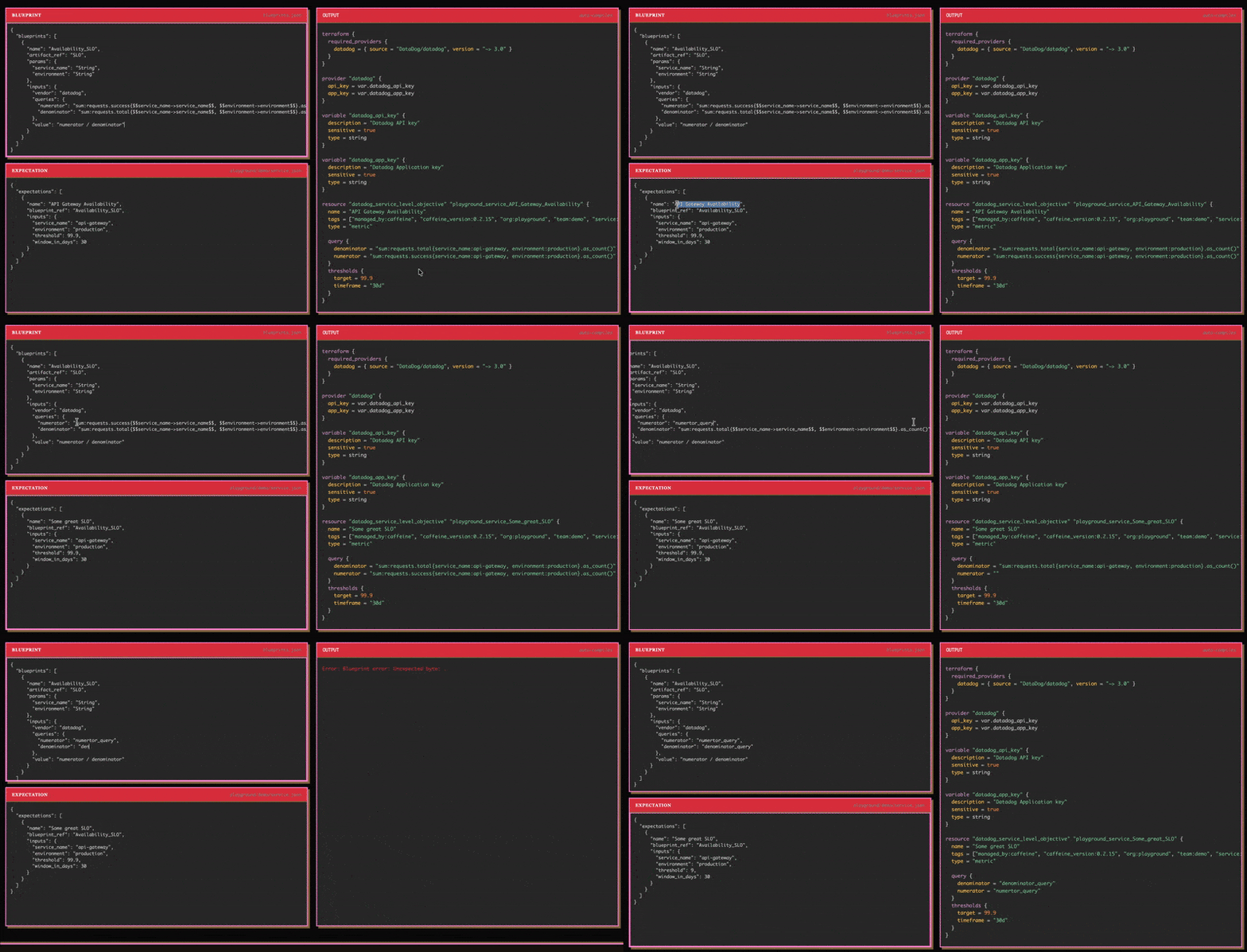
Here is me changing some text and seeing the compilation results (and apologies for how small the gif is 😓):
Update January 2026: The Cafe is Now the Tour
We ended up retiring the standalone cafe in favor of the Tour, an interactive, guided walkthrough of the language. The core idea is the same: live editors, in-browser compilation, instant output. But instead of dropping you into a blank editor and wishing you luck, the tour walks you through Caffeine step by step across a host of lessons, from basics to a complete example.
This was the natural next step. As mentioned above, Caffeine is pretty niche and "likely calls for some sort of interactive tour-like tutorial." Well, we built it! The compilation pipeline, the debounced auto-compile, the CodeMirror editors all carries over. We just wrapped it in a proper learning experience.